Skip to content

Project management system

Your team’s tasks, hours and email — in one place

Vale is for teams that have outgrown spreadsheets and chat apps. Tasks on a board, a timer in every task, client emails right next to the work they’re about, and a monthly report you don’t have to put together by hand.

Free for up to 5 people. No credit card required.

Features

One task, with every detail attached

The description, files, client emails, comments and hours spent all live on the task card. No more trying to remember which chat it was in.

Projects and tasks

Board, list, calendar or timeline — whatever works for you

Everyone sees the same task in their own view: the manager gets the project timeline, the assignee gets today’s to-do list. Statuses, priorities, due dates, labels, subtasks and checklists work out of the box, no setup needed.

  • Drag a card and the status changes for everyone
  • “My tasks”: everything assigned to you, across all projects
  • Quick search and keyboard shortcuts

Time tracking

A timer right in the task, hours straight in the report

Start the timer when you pick up a task and stop it when you’re done — Vale will offer to add a short note. At the end of the month you can see how many hours went into each project and each person, and how that compares to the plan.

  • Monthly hours plan with a “today” marker
  • Log time manually, after the fact
  • Reports by person and project, with Excel export

Mail

Turn a client email into a task in one click

Connect Gmail, Outlook or your company mailbox. New emails arrive instantly, and read, moved and deleted messages stay in sync with your mailbox. Create a task from an email or attach it to an existing one — and the conversation stays right next to the work.

  • Reply to clients without leaving Vale
  • Shared mailboxes for your department
  • Signatures and email formatting

Mobile app

Vale in your pocket: tasks, timer and team

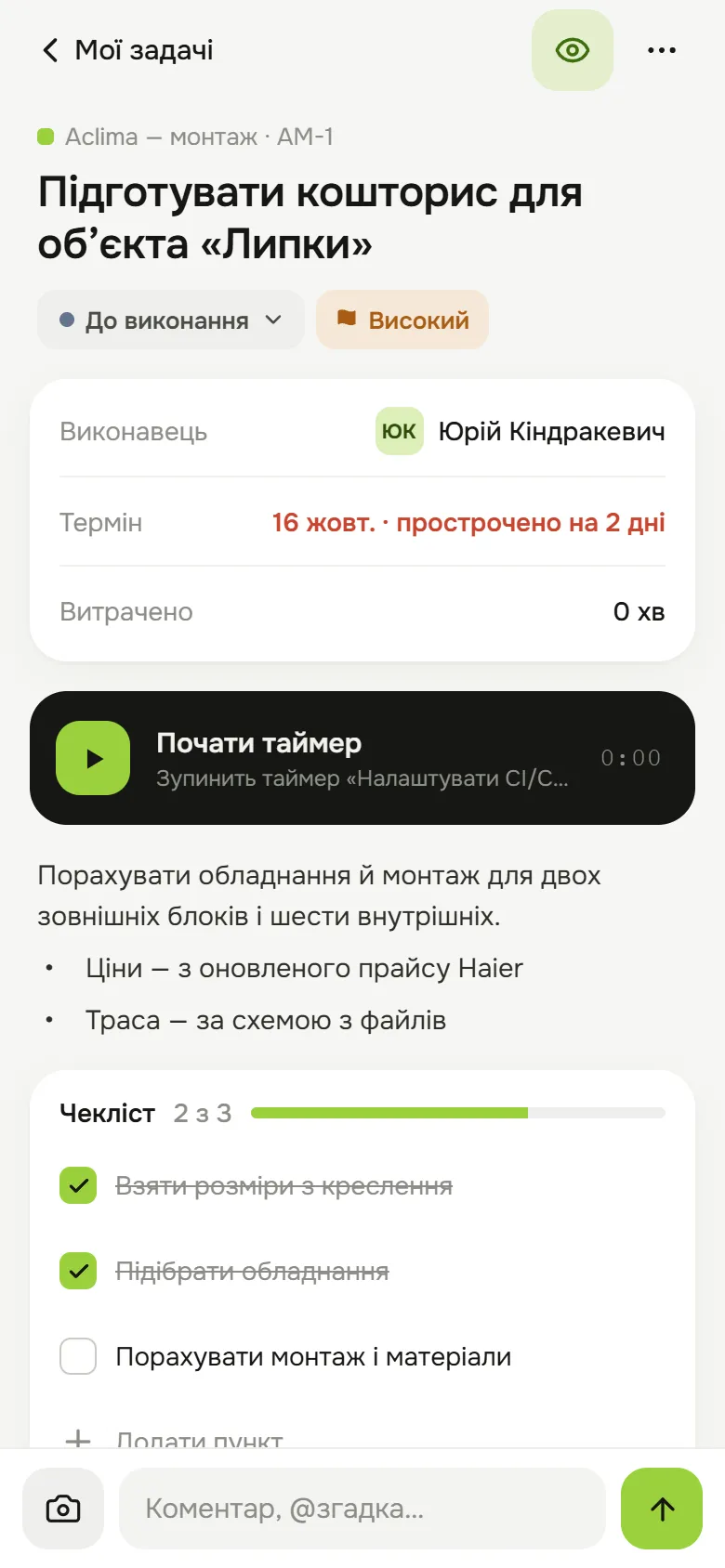
The same account and the same data as on your computer. Open a task on site, snap a photo, start the timer — and your team already sees it.

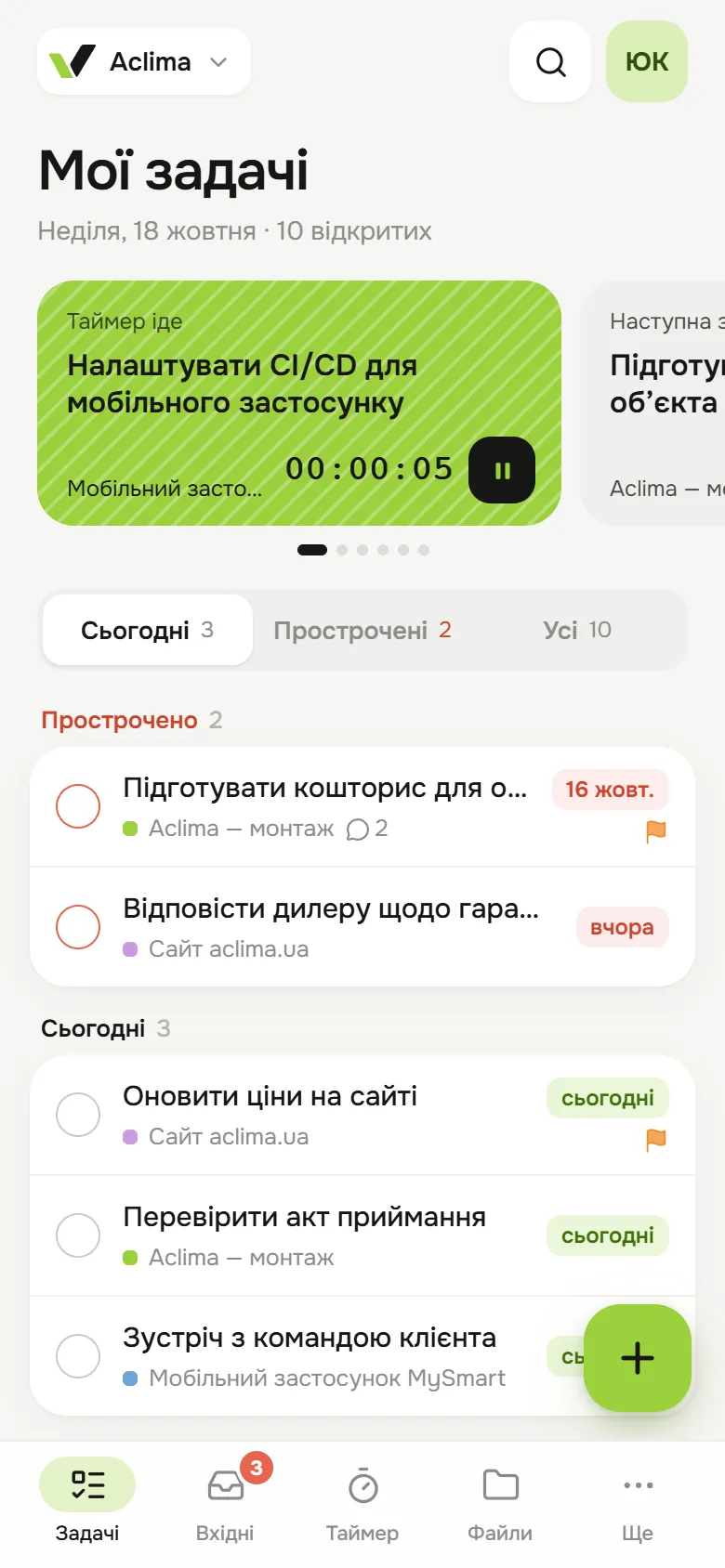
  • “My focus” and today’s tasks on the first screen
  • Start the timer with one tap, right from the focus card
  • Camera photos go straight into a task or Files
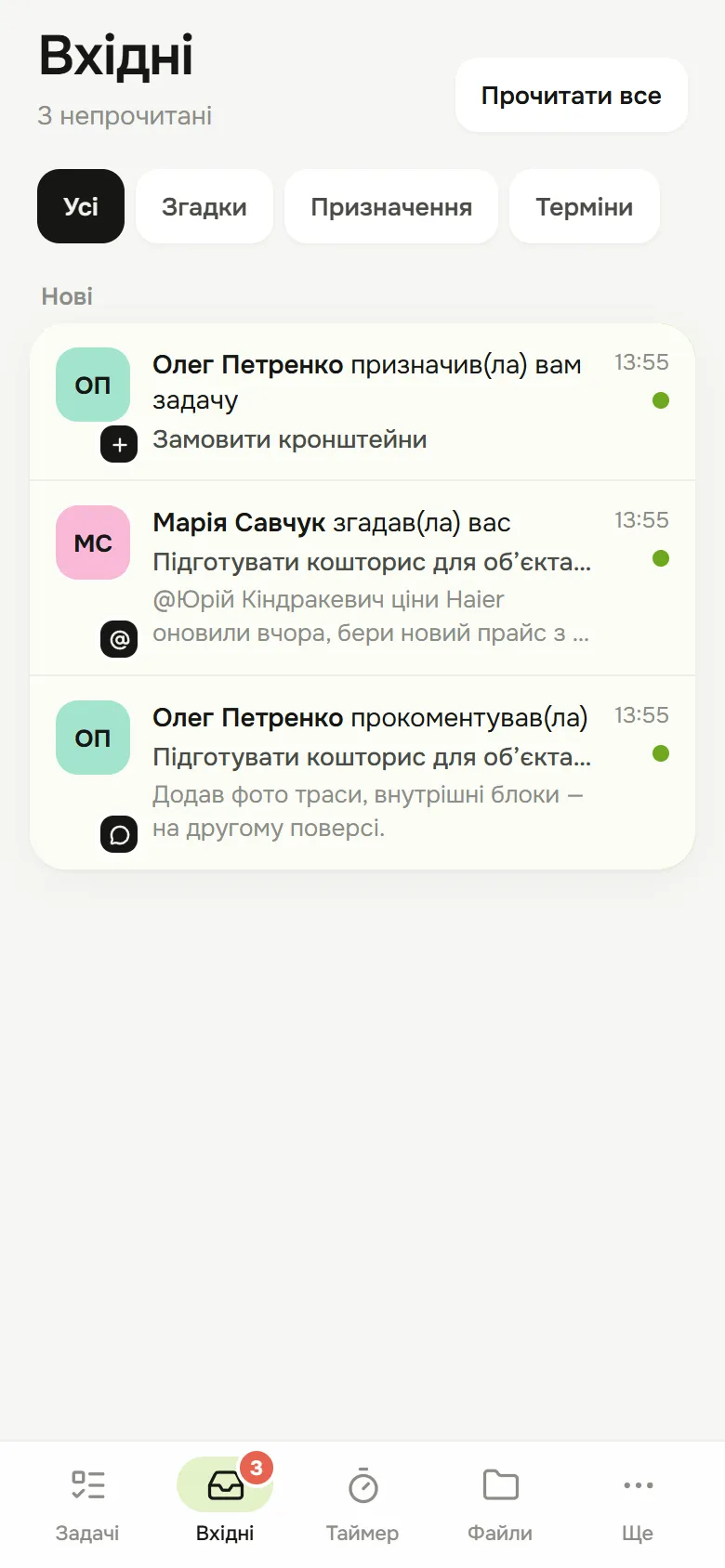
  • Notifications for mentions, assignments and due dates

Coming soon to the App Store and Google Play

Task screen: status, due date, timer and checklist
Inbox screen: mentions, assignments and comments
“My tasks” screen: timer card, overdue and today’s tasks

Also in Vale

Things that usually live in separate apps

File share links

Send a client drawings or site photos via a link that lasts 1, 7 or 30 days — with a password and a download limit. You can revoke the link at any time.

Secure messages

Keep passwords and logins out of chat apps. The text is encrypted right in your browser, and the message disappears after it’s first viewed or at a time you set.

Telegram

Personal notifications about your tasks and a shared chat for projects. Reply to a notification and it becomes a comment on the task.

Reporting assistant

Ask in plain words and get a table right in the chat, or an Excel, CSV, PDF or Word file.

API, webhooks, MCP

A public API with access tokens, webhooks for task events and an MCP connector for your AI assistant.

API documentation

Where Vale comes from

We build it for a team that works in it every day

Vale started as an in-house tool for sales, service and installation teams. They’re the first to tell us when something is inconvenient — which is why it has mail next to tasks, a timer on every card and reports with no manual number-crunching.

Now we’re opening Vale up to other companies. If something’s missing, write to us — we read every message.

Contact us

Pricing

Pay only for the people who use it

Start for free and switch to a paid plan when your team grows. Pay yearly and save 25%.

Billing
Team size

Free

For small teams moving off chats and spreadsheets.

$0
per person per month
Free forever
Only up to 5 people
10 people need a paid plan
Get started free
People
up to 5
Projects
2
Storage
1 GB per account
What’s included
  • Tasks, subtasks and checklists
  • Priorities, due dates and labels
  • Board, list and calendar
  • Comments with mentions
  • Files in tasks
  • Telegram notifications

Basic

For teams that need roles, reports and unlimited projects.

$3.75$5
per person per month
$45 per person per year instead of $60
$37.50 per month
for a team of 10
Try it
People
Unlimited
Projects
Unlimited
Storage
2 GB per person
Everything in Free, plus:
  • Roles: owner, admin, member
  • View-only access
  • Team dashboard
  • Project and people reports
  • Export to Excel and CSV

Business

Recommended

For companies that track time and work with clients and email.

$7.50$10
per person per month
$90 per person per year instead of $120
$75 per month
for a team of 10
Try it
People
Unlimited
Projects
Unlimited
Storage
5 GB per person
Everything in Basic, plus:
  • Guests: clients and contractors
  • Time tracking and timer
  • Project timeline
  • Mail next to tasks
  • Reporting assistant
  • API, webhooks and MCP

Premium

For those who need secure data sharing and personal support.

$11.25$15
per person per month
$135 per person per year instead of $180
$112.50 per month
for a team of 10
Try it
People
Unlimited
Projects
Unlimited
Storage
10 GB per person
Everything in Business, plus:
  • Secure messages
  • Password-protected file links
  • Shared mailboxes
  • Migration help
  • Dedicated account manager
Prices are in US dollars.Compare all features

FAQ

Questions and answers

How much will Vale cost for my team?

Paid plans are priced per person on your team. For example, 12 people on the Business plan billed yearly come to 12 × $7.50 = $90 per month. The Free plan covers teams of up to 5 people and 2 projects.

Do I need a credit card to get started?

No. Sign up, create a project and invite your colleagues. You can switch to a paid plan later, whenever you need it.

Can I invite a client or a contractor?

Yes. Guests only see the projects they’ve been added to. Guest access is available on the Business and Premium plans.

Which email accounts can I connect?

Gmail, Outlook, Yahoo and any mailbox with IMAP and SMTP. For Gmail and Yahoo you’ll need an app password — you can create one in your email account’s security settings.

Is there a mobile app?

Not yet. Vale works in your phone’s browser, and Telegram is a handy way to get notifications and send quick replies.

What languages is the interface available in?

Spanish, English and Russian. Everyone picks their own language in their profile.

Can I bring my data over from another system?

Import of projects, tasks and comments is in the works. Write to us — we’ll help you move over and suggest where to start.

Can I connect Vale to other services?

Yes: there’s a documented public API, webhooks for task events and an MCP connector for AI assistants.

Try it on a real project

Set up your first project in a few minutes and invite your colleagues. Free for up to 5 people.